SolidQueue is the default queue system shipped with Ruby on Rails. It’s a great choice for your jobs, and works out of the box with Postgres, SQLite and MySQL.
It took two and a half years, but as of SolidQueue 1.7, it supports batches of jobs as well! We’ll dig into what batch support means for SolidQueue, and how you can use it to orchestrate jobs in new and powerful ways.
What is a “batch”?
At its simplest, a batch is just a group of jobs that can be tracked together.
SolidQueue::Batch.enqueue do
  MyJob.perform_later
  MyOtherJob.perform_later
end
The batch itself has information about the status of the batch:
batch = SolidQueue::Batch.find(id)
batch.finished?
batch.succeeded?
batch.failed?
There are also methods to get current job counts:
batch.completed_jobs
batch.failed_jobs
batch.pending_jobs
📝 While a batch is active, batch job count lookups use actual
COUNTqueries in the database. I’d avoid using them in any kind of hot code path, if at all. This may improve in the future.
That’s the basic concept, but it isn’t particularly useful on its own. What can we actually do with the batch?
Reacting to job status
The real power of a batch comes from coordinating actions based on the status of the group. To support that, batches have several options:
on_finish: an ActiveJob class that is enqueued once every job has finished running or has failed, including retries.on_success: an ActiveJob class that is enqueued once every job has finished running successfully, including retries. It won’t run if any job failed, but it will run if jobs were discarded usingdiscard_on.on_failure: an ActiveJob class that is enqueued once every job has finished running, including retries, and one or more of the jobs faileddescription: a description associated with the batchmetadata: information you want to attach to the batch, in general used as context for the callbacks or child jobs
For instance:
SolidQueue::Batch.enqueue(
  on_finish: OnFinishJob,
  on_success: OnSuccessJob,
  on_failure: OnFailureJob,
  description: "Be who you were meant to be",
  metadata: { user_id: }
) do
  MyJob.perform_later
  MyOtherJob.perform_later
end
You can specify any combination of these options. For example, if you only want a callback to fire when all jobs finish, regardless of success or failure:
SolidQueue::Batch.enqueue(
  on_finish: OnFinishJob
) do
  # ...
end
Customizing callbacks
Callback jobs are just regular ActiveJob classes. The examples so far have shown handing the class in directly, but you can also customize an instance using normal ActiveJob methods.
For instance, the set method can be used to change queues, priority, and set schedules, just like a normal enqueue. You just have to create an instance before calling it:
SolidQueue::Batch.enqueue(
  on_finish: OnFinishCallback.new.set(queue: :my_queue, priority: 1),
  on_success: OnSuccessJob.new.set(wait: 5.minutes),
  on_failure: OnFailureJob.new.set(wait_until: 10.minutes.from_now),
) do
  #...
end
📝
waitandwait_untilare evaluated when you enqueue the batch. So in our example if the batch finished 15 minutes after being enqueued, the success and failure callbacks would be run immediately
Anything you can do when constructing a job is available using the job instance in your callbacks. If you want to hand arguments in like you would when calling perform_later, you can use new:
SolidQueue::Batch.enqueue(
  on_finish: OnFinishCallback.new("an argument")
) do
  #...
end
Batch metadata
There’s often context you want to have on hand once your batch completes, or that may be useful to child jobs. You can add metadata to a batch explicitly:
SolidQueue::Batch.enqueue(
  metadata: { user_id: },
) do
  #...
end
Or the more convenient shorthand, where any extra parameters handed in are considered metadata:
SolidQueue::Batch.enqueue(
  user_id:
) do
  #...
end
Accessing the batch from a job
Jobs can access the batch they’re part of by calling the batch method.
class MyJob < ApplicationJob
  def perform
    puts "Running in batch #{batch.id} with metadata #{batch.metadata}"
  end
end
The most interesting thing this enables is adding more jobs to a batch:
class MyJob < ApplicationJob
  def perform
    batch.enqueue do
      NestedJob.perform_later
    end
  end
end
This is the only safe way to add jobs once a batch has started. The batch can’t finish until the jobs running in it finish, so adding a job to the batch within this job won’t encounter any kind of race condition.
It allows for some interesting capabilities and dynamic behavior within your batch - flexibly adding more jobs as needed as the batch progresses.
SolidQueue compatibility
Batches work well with all SolidQueue features. Scheduled, concurrency controlled, bulk enqueued, and after_commit enqueued jobs all work normally:
class ConcurrencyControlledJob < ApplicationJob
  limits_concurrency to: 1

  def perform; end
end

SolidQueue::Batch.enqueue do
  MyJob.set(wait_until: 1.hour.from_now).perform_later
  ActiveJob.perform_all_later([
    ConcurrencyControlledJob.new,
    ConcurrencyControlledJob.new,
    ConcurrencyControlledJob.new
  ])
end
In that example, three things are being demonstrated:
- The batch won’t finish until at least an hour later, once MyJob runs
- Three ConcurrencyControlledJob instances get bulk enqueued, but appropriately related to the batch
- Concurrency for ConcurrencyControlledJob is limited to one job at a time. The batch won’t finish until each job is able to acquire the concurrency semaphore and finish running
Batches also support enqueue_after_transaction_commit:
class ApplicationJob < ActiveJob::Base
  self.enqueue_after_transaction_commit = true
end

ActiveRecord::Base.transaction do
  post = Post.create!
  SolidQueue::Batch.enqueue do
    NotifyJob.perform_later(post)
  end
end
# Batch starts here, and no jobs are missed even though they are also deferred
Different combinations of the flag also work properly:
class ApplicationJob < ActiveJob::Base
  self.enqueue_after_transaction_commit = false
end

class NotifyJob < ApplicationJob
  self.enqueue_after_transaction_commit = true
  #...
end

class ImmediateJob < ApplicationJob
  # inherits false from base job class
end

ActiveRecord::Base.transaction do
  post = Post.create!
  SolidQueue::Batch.enqueue do
    # Enqueues after the commit
    NotifyJob.perform_later(post)
    # Enqueues with the commit
    ImmediateJob.perform_later
  end
end
# Batch starts here
To properly support both scenarios, batches only start after all transactions commit1 in all cases.
Nested job calls
Batches also track themselves in an IsolationExecutionState (the Rails wrapper around thread/fiber locals), so jobs enqueued anywhere inside the enqueue callback will associate with the batch.
def enqueue_job
  MyJob.perform_later
  enqueue_job_deeper
end

def enqueue_job_deeper
  MyOtherJob.perform_later
end

SolidQueue::Batch.enqueue do
  # all nested calls properly relate to the batch
  enqueue_job
end
“Immutable” batches
Batches are just an ActiveRecord model, so technically you can manipulate them the same way you would manipulate any other model.
The arguments you hand into enqueue are not intended to be changed past that point. If you need to, it’s possible, but you’re responsible for making sure they aren’t overwritten accidentally by concurrent jobs/processes, and that the data you need is updated before any callbacks are run.
📝 The one exception to this is enqueueing jobs within jobs that are part of the batch, which we described earlier in Accessing the batch from a job.
Once a batch is finished, however, SolidQueue will not allow you to enqueue more jobs to it. If you attempt to enqueue a job to a finished batch, it will raise an AlreadyFinished error:
SolidQueue::Batch.enqueue(
  on_finish: OnFinishCallbackJob
) {}

class OnFinishCallbackJob < ApplicationJob
  def perform
    # Raises AlreadyFinished
    batch.enqueue do
      #...
    end
  end
end
In GoodJob, batches are explicitly, intentionally mutable, which allows for some recursive, multi-step scenarios. To implement similar logic in SolidQueue, you can achieve it by triggering new batches, reusing the same callback with different metadata:
class BatchWorkJob < ApplicationJob
  def perform(step)
    puts "BatchWorkJob: #{step}"
    if step == 'e'
      batch.enqueue { BatchWorkJob.perform_later('f') }
      puts "BatchWorkJob: enqueue f"
    end
  end
end

class BatchJob < ApplicationJob
  def perform
    metadata = batch.metadata
    if metadata[:stage].nil?
      puts "BatchJob: initial stage"
      SolidQueue::Batch.enqueue(on_finish: BatchJob, stage: 1) do
         BatchWorkJob.perform_later('a')
         BatchWorkJob.perform_later('b')
         BatchWorkJob.perform_later('c')
       end
    elsif metadata[:stage] == 1
      puts "BatchJob: stage 1"
      SolidQueue::Batch.enqueue(on_finish: BatchJob, stage: 2) do
        BatchWorkJob.perform_later('d')
        BatchWorkJob.perform_later('e')
      end
    elsif metadata[:stage] == 2
      puts "BatchJob: stage 2"
      # ...
    end
  end
end

SolidQueue::Batch.enqueue(on_finish: BatchJob)

# BatchJob: initial stage
# BatchWorkJob: c
# BatchWorkJob: a
# BatchWorkJob: b
# BatchJob: stage 1
# BatchWorkJob: d
# BatchWorkJob: e
# BatchWorkJob: enqueue f
# BatchWorkJob: f
# BatchJob: stage 2
Caution in callbacks
Technically you can query the SolidQueue job records associated with a batch in a callback. A SolidQueue::Batch is just a normal model. I’d recommend against it for a few reasons:
SolidQueue::Jobrecords can get deleted based on your settings- If you have a particularly large batch, it may be a performance hit to query related jobs
- SolidQueue creates a new job record for every retry, each associated with the same
active_job_id. That means you have to account for potential “duplicate” records when querying
Instead, utilize batch metadata, batch job counts, and records related to the processing. Once a batch has finished, batch counts such as completed_jobs and failed_jobs are inexpensive as they’re simple columns on the model. And metadata is generally used to correlate data from the start of the batch with the callback jobs:
SolidQueue::Batch.enqueue(
  # Handing in a GlobalID compatible record works in callbacks
  on_finish: OnFinishJob.new(parent_record),
  user_id: user_id
) do
  #...
end

class OnFinishJob < ApplicationJob
  def perform(parent_record)
    if batch.failed_jobs > 0
      # ...
    end

    user = User.find(batch.metadata[:user_id])
    process_results(parent_record.children)
  end
end
MissionControl
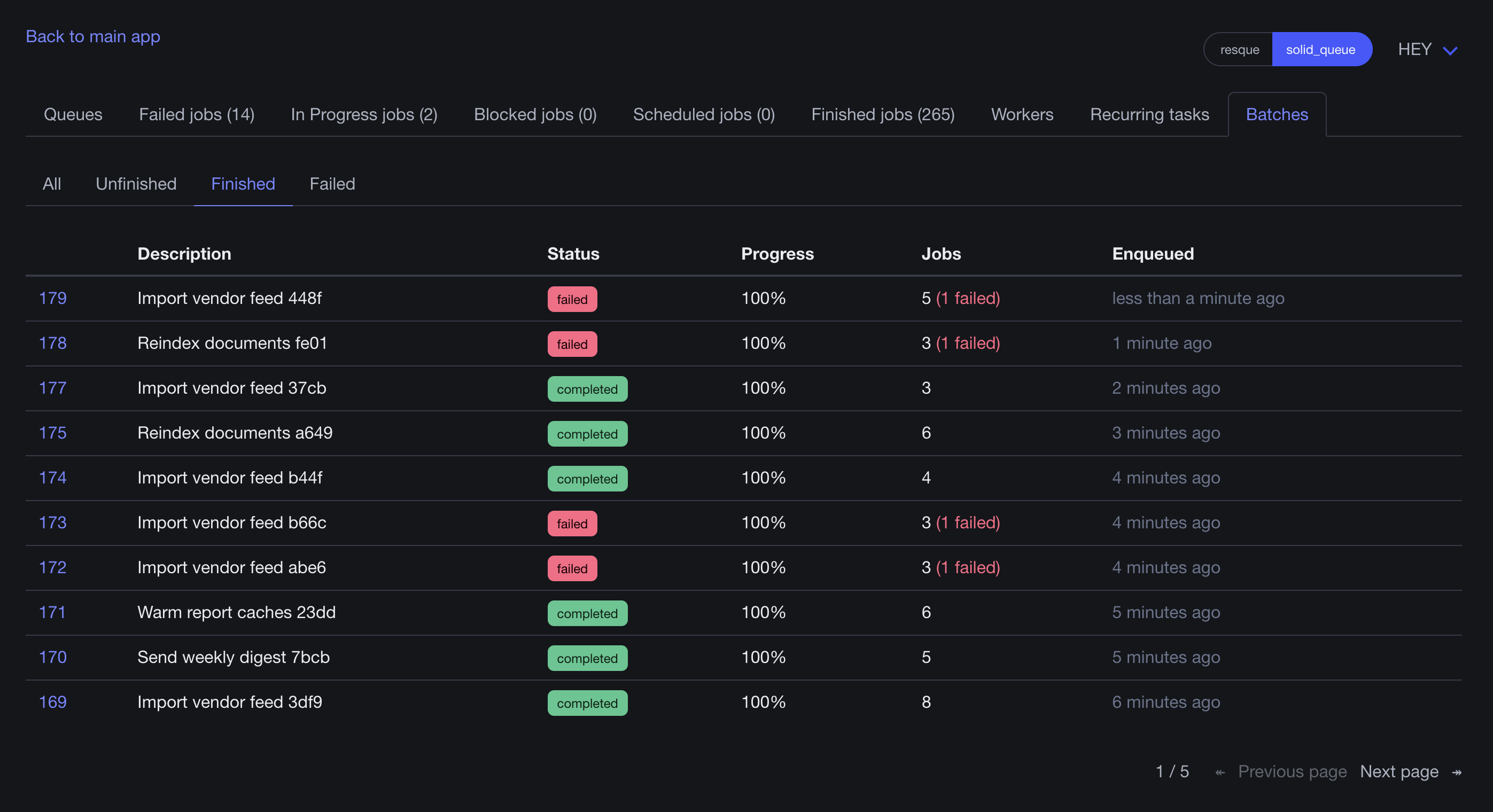
UI support for batches hasn’t landed in mission_control-jobs yet, but there is a PR to add it in. Here’s a visual of what support looks like so far:
Configuration options
There are more options available for batches, in terms of how to manage them. For information on how to clean up batches, and internals of how batches are kept healthy when faced with process crashes and servers getting unplugged, see SolidQueue docs.
Some practical examples
Now that you know how to utilize the batch API, let’s put it to work! We’ll start out with an example of splitting up a log processing task, build a chat harness for managing LLM sub agents, and demonstrate a multi level batch.
Log parsing
In this example, we presume some logs have been stored in Redis2, and we use a batch to split the log processing into chunks. This allows us to parallelize the work, and only act on the results once the entire group has finished processing. We use on_finish here, which means even if a job fails, our callback job is still triggered:
# Logs stored in redis
# `run_key` is the key, `chunks` is number of pieces to process

SolidQueue::Batch.enqueue(
  # Easier identification of the batch, and will show up in MissionControl once batch support lands
  description: "log run #{run_key}: #{lines} lines in #{chunks} chunks",
  # Callback run when all jobs have finished running, including retries
  on_finish: SummarizeLogRunJob,
  # `run_key` and `chunks` persist as batch metadata, and are accessible in all batch jobs and callbacks
  run_key: run_key,
  chunks: chunks
) do
  chunks.times do |i|
    AnalyzeLogChunkJob.perform_later(run_key, i)
  end
end
In each child job, we pull data from the provided key, only analyzing that one chunk. This is pretty basic processing, but each line requires a Redis call - by breaking it up into individual jobs you take advantage of IO parallelization in Ruby. You’re able to lean on the job system, rather than managing your own threads/fibers/etc3:
class AnalyzeLogChunkJob < ApplicationJob
  LINE = /\A(?<status>\d{3}) (?<ms>\d+) (?<path>\S+)\z/

  # This is just a normal job - it doesn't even have a concept of being a part of a batch
  def perform(run_key, index)
    redis = Redis.new
    raw = redis.get("logrun:#{run_key}:input:#{index}")

    stats = { "lines" => 0, "errors" => 0, "ms" => [], "paths" => Hash.new(0) }

    JSON.parse(raw).each do |line|
      stats["lines"] += 1
      match = LINE.match(line.strip)

      stats["errors"] += 1 if match[:status].to_i >= 500
      stats["ms"] << match[:ms].to_i
      stats["paths"][match[:path]] += 1
    end

    redis.rpush(
      "logrun:#{run_key}:chunks", JSON.generate(stats)
    )
  end
end
In our callback job, we access the metadata to determine which key we operated on and how many chunks we expect to have. Then we can summarize that data:
class SummarizeLogRunJob < ApplicationJob
  def perform
    redis = Redis.new
    run_key = batch.metadata["run_key"]
    expected = batch.metadata["chunks"].to_i

    pushed = redis.lrange(
      "logrun:#{run_key}:chunks", 0, -1
    ).map { |raw| JSON.parse(raw) }

    # Validate pushed count against expected count...
    # Summarize retrieved data...
  end
end
RubyLLM sub agents
In this example, we’re utilizing batches to manage sub agents within a RubyLLM chat. If you’ve never used it, RubyLLM is an incredible tool for managing LLM interactions. This example benefits from having an understanding of RubyLLM, but I’d encourage you to work your way through it, and to give RubyLLM a try if you haven’t before. There is more setup needed to get the full example working, but you can follow RubyLLM’s getting started tutorials on how to get everything running.
To start, we’ve got a Chat model for interacting with an LLM and storing the results:
class Chat < ApplicationRecord
  acts_as_chat
end
Next, we’ll create a RubyLLM tool, which we can associate with a chat and gives the LLM the ability to invoke our code when it needs to achieve a task:
class DelegateTool < RubyLLM::Tool
  # Tells the LLM what the purpose of this tool is
  description "Run independent subtasks in parallel sub-agents. Returns immediately: " \
                       "the results are delivered to you automatically once every subtask finishes. " \
                       "Use this once, with all the subtasks you need."
  # Tells the LLM what parameters it can provide
  param :subtasks, type: :array, desc: "Self-contained task descriptions", required: true

  # We store the chat instance, so we can access it when establishing our batch
  def initialize(chat)
    @\chat = chat
  end

  def execute(subtasks:)
    subtasks = Array(subtasks).map(&:to_s).reject(&:blank?)

    batch = nil
    ActiveRecord::Base.transaction do
      chats = subtasks.map {
        Chat.create!(model_id: \@chat.model_id)
      }
      batch = enqueue_batch(chats, subtasks)
    end

    # `halt` is a way of telling the LLM we're stopping the chat here, and there's some action we need to take (`halt` is going away in RubyLLM 2.0, but is the standard way of handling this for now)
    halt "Delegated #{subtasks.size} subtasks as batch #{batch.id}. " \
            "This conversation is now paused until they all finish."
  end

  private

  def enqueue_batch(chats, subtasks)
    SolidQueue::Batch.enqueue(
      # Once again, a user readable description for the batch
      description: "Chat #{@chat.id}: #{subtasks.size} sub-agents",
      # What to call when all jobs are finished
      on_finish: ResumeParentChatJob,
      # `chat_id` in the metadata, to look up in the chat later
      parent_chat_id: @\chat.id,
      sub_agent_chat_ids: chats.map(&:id)
    ) do
      chats.each_with_index do |chat, i|
        SubAgentJob.perform_later(chat, subtasks[i])
      end
    end
  end
end
Our SubAgentJob simply uses the chat to ask the LLM about the assignment:
class SubAgentJob < ApplicationJob
  def perform(chat, assignment)
    chat.with_instructions(
      "You are a focused worker agent. Answer only the task you are given, " \
      "in at most a short paragraph. Do not ask questions."
    )
    .ask(assignment)
  end
end
To kick things off, we ask the LLM a question, and supply our delegation tool:
prompt = "Compare how SolidQueue, GoodJob and Sidekiq Pro implement job batches. " \
                 "Delegate one subtask per library, then summarize the differences."

chat = Chat.create!
chat.with_tools(DelegateTool)
chat.ask(prompt)
The LLM will almost certainly invoke our tool, which will trigger our batch. Once the batch finishes, ResumeParentChatJob fires and the main chat is started back up again, with the answers from each of the “sub agents”:
class ResumeParentChatJob < ApplicationJob
  def perform
    parent = Chat.find_by(id: batch.metadata["parent_chat_id"])
    sub_agents = Chat.where(
      id: batch.metadata["sub_agent_chat_ids"]
    )

    parent.with_tools(DelegateTool).ask(
      results_for(parent, sub_agents)
    )
  end

  private
  def results_for(parent, sub_agents)
    sections = sub_agents.order(:id).map do |sub_agent|
      answer = sub_agent.messages.last&.content
      "## #{answer.presence || "(this sub-agent produced no answer)"}"
    end

    failed = batch.failed_jobs
    <<~RESULTS
        All #{batch.total_jobs} sub-agents have finished#{failed.positive? ? ", #{failed} of them failed" : ""}.
        Here is what they reported. Summarize the findings for the user; do not delegate again.

        #{sections.join("\n\n")}
    RESULTS
  end
end
Adding a bit of fiber
If you want to supercharge the sub agent example, give it a boost of fiber with Async-based fiber support in SolidQueue4:
workers:
  queues: "chat"
  fibers: 50
  polling_interval: 0.05
Inside of application.rb, make sure to set your isolation level to :fiber:
config.active_support.isolation_level = :fiber
There’s nothing else special you’d need to do - Rails is fiber compatible, and LLM interactions are heavily IO bound so they benefit from fibers tremendously!
Multiple batch levels
As a final, more layered example, we’ll show an ETL (Extract-Transform-Load) pipeline with nested batches - each responsible for handling that step of the process.
First we kick things off like usual, though in this instance we only care if the jobs succeed:
SolidQueue::Batch.enqueue(
  on_success: ExtractSuccessJob
) do
  ExtractJob.perform_later
end
In our extraction job, we break things down even more - we extend the batch further, by subdividing our extraction into several smaller jobs. We can safely enqueue more jobs here on an existing batch because we are running inside of one of the batch’s own jobs:
class ExtractJob < ApplicationJob
  def perform
    batch.enqueue do
      extract_in_chunks.each do |chunk_id|
        ExtractChunkJob.perform_later(chunk_id)
      end
    end
  end

  def extract_in_chunks
    # ...
  end
end
The rest fills out the remainder of the pipeline. After extraction, transform, after transformation, load:
class ExtractSuccessJob < ApplicationJob
  def perform
    SolidQueue::Batch.enqueue(
      on_success: TransformSuccessJob
    ) do
      TransformJob.perform_later
    end
  end
end

class TransformSuccessJob < ApplicationJob
  def perform
    SolidQueue::Batch.enqueue(
      on_success: EtlFinalizeJob
    ) do
      LoadJob.perform_later
    end
  end
end

class EtlFinalizeJob < ApplicationJob
  def perform
    #...
  end
end
That’s about it for batches! 👋🏼
Inspired by
If you like the look of batches in SolidQueue, and you’re currently a user of GoodJob or Sidekiq, check out the batch options available to them! Batches in the Rails ecosystem wouldn’t exist without Sidekiq Pro leading the way, and GoodJob batches were a definite inspiration as well.
-
If anything happens while it attempts to start, like a server crash, SolidQueue has internals that make sure the batch eventually starts. You can technically disable those internals, but I’d recommend against it when using batches ↩︎
-
I know it would be insane to store logs in Redis. But it makes for an easy way to demonstrate pulling data arbitrarily from a source ↩︎
-
Not to mention things like built-in retries and priority ↩︎
-
You can learn more about that in the SolidQueue docs, and an explanation from the feature’s author Carmine ↩︎